What we text
Each text is one line about something waiting for you, and a link that opens it on Openbook once you sign in. It never carries a contact’s number or any other detail.
Openbook: Mo asked you for Ida Moss’s mobile number.
Open: https://withopenbook.com/app/notice/…
Reply STOP to stop texts.Openbook: Priya shared Diego Ruiz’s mobile number with you.
Open: https://withopenbook.com/app/notice/…
Reply STOP to stop texts.Openbook: Reminder: Ben suggested a change to Hana Sato.
Open: https://withopenbook.com/app/notice/…
Reply STOP to stop texts.- How often varies with what happens in your groups, and is never more than 10 a day.
- Msg & data rates may apply, from your mobile carrier.
- They come from Openbook as RCS messages where your phone and carrier support them, and otherwise as SMS from Openbook’s number, (650) 275-5933.
How to turn them on
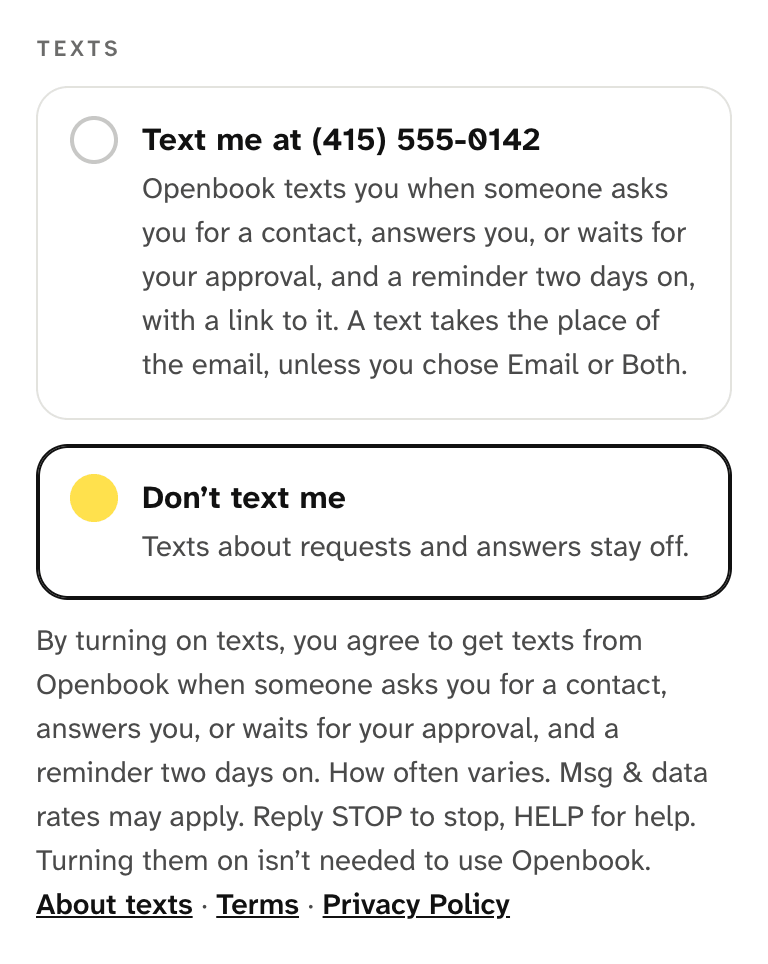
Texts are off until you turn them on. Sign in at withopenbook.com, open Manage Account, then How Openbook reaches you, and under Texts tap Text me at your number. The tap saves it. It looks like this, with Don’t text me picked until you pick the other:
By turning on texts, you agree to get texts from Openbook when someone asks you for a contact, answers you, or waits for your approval, and a reminder two days on. How often varies. Msg & data rates may apply. Reply STOP to stop, HELP for help. Turning them on isn’t needed to use Openbook. About texts · Terms · Privacy Policy
You can also ask ChatGPT, Claude or Grok to turn texts on for you, once Openbook is connected to it. Either way, texts go only to the mobile number on your account, which you confirmed with a code, and the moment they’re on, we text you:
Openbook: Texts are on. We’ll text you when someone asks you for a contact, answers you, or waits for your approval, and a reminder two days on. How often varies. Msg & data rates may apply. Reply HELP for help, STOP to stop.You don’t need texts to use Openbook: requests and answers still reach you by email, or in ChatGPT while it watches Openbook for you.
How to stop
Reply STOP to any text, or tap Don’t text me under Texts on Manage Account. Changing your number turns texts off too. When you reply STOP, we text back:
Openbook: Texts are off, and you won’t get any more from this number. Reply START to turn them back on.Reply START to turn them back on:
Openbook: Texts are on again. We’ll text you when someone asks you for a contact, answers you, or waits for your approval, and a reminder two days on. How often varies. Msg & data rates may apply. Reply HELP for help, STOP to stop.Help
Reply HELP to any text for this:
Openbook: Texts about requests and answers on your Openbook account. Help: support@withopenbook.com or withopenbook.com/texts. Msg & data rates may apply. Reply STOP to stop.Or write to support@withopenbook.com. The Terms of Service say more about texts, and the Privacy Policy what we keep: mobile numbers and consent to texts are never shared with anyone for their own marketing.